


Light Spectrometer - Dominant Wavelength Meter
Measure the dominant wavelength of colored light sources with your smartphone - perfect for education, LED testing, and research
Transform your phone into a light spectrometer that measures dominant wavelength (nm), frequency (THz), and period (fs) of colored light. Point your camera at a white surface illuminated by your target light, and get instant nanometer-precise readings. An affordable alternative to expensive equipment, trusted by educators and light enthusiasts worldwide.




Applications
🎓 Educational Applications
An affordable alternative to expensive lab equipment for teaching light physics and spectroscopy. Perfect for classroom demonstrations, student experiments, and hands-on learning about electromagnetic spectrum. Used by educators worldwide to make complex optical concepts accessible and engaging.
💡 LED Verification
Verify LED wavelength specifications, test light therapy devices, or measure any colored light source for quality control and research applications. Colored LEDs emits light at specific wavelengths. This app helps you measure these precise wavelengths, making it perfect for LED verification, educational demonstrations, and understanding how different light sources produce their characteristic colors.

🌈 Light Therapy
With this app you can confirm therapeutic light devices emit the correct wavelengths for optimal benefits.
Understanding Light and Wavelengths
What is Light?
Light is electromagnetic radiation that travels in waves through space. Just like ocean waves have different heights and distances between peaks, light waves have different wavelengths - the distance between wave peaks. Each wavelength corresponds to a specific color that we perceive, from deep violet at shorter wavelengths to bright red at longer wavelengths.
The Visible Spectrum
Human eyes can detect light wavelengths roughly between 380-700 nanometers (nm). This visible spectrum progresses from violet (~400nm) through blue, green, yellow, and orange to red (~700nm). Beyond this range lie ultraviolet (UV) light at shorter wavelengths and infrared (IR) light at longer wavelengths, which we cannot see but can sometimes feel as heat.

What is White Light?
White light is constituted of a mixture of all visible colors (wavelengths) combined together. When sunlight passes through a prism, it separates into all the colors of the rainbow because white light actually contains the entire visible spectrum. Common sources of white light include sunlight, incandescent bulbs, and white LEDs. Unlike colored light sources that emit primarily one wavelength, white light sources emit a broad range of wavelengths simultaneously, which is why they don't have a single dominant wavelength but instead are characterized by their color temperature.
What is Dominant Wavelength?
While most light sources emit multiple wavelengths simultaneously, the "dominant wavelength" is the single wavelength that most closely matches the perceived color. Think of it as the main color signature of a light source. For example, a red LED might emit some orange and deep red wavelengths, but its dominant wavelength might be 660nm - the strongest red component that defines its appearance.
Important: Dominant wavelength is only meaningful for measuring colored light sources. White light (such as sunlight, incandescent bulbs, or white LEDs) contains all visible wavelengths mixed together and doesn't have a single dominant wavelength. For white light sources, what matters is their color temperature - whether they appear warm (yellowish) or cool (bluish). To measure color temperature in Kelvin, use our specialized Kelvin Meter app instead.
Why is Pink Not in the Spectrum?
If you look at a rainbow or the visible light spectrum, you'll notice something fascinating: pink is nowhere to be found. While we can see violet, blue, green, yellow, orange, and red in nature's spectrum, pink is mysteriously absent. This isn't an oversight - it's a fundamental aspect of how light and color work.
Pink is what scientists call a "non-spectral color" - it doesn't correspond to any single wavelength of light. Instead, pink is created when our eyes perceive a mixture of red light (long wavelengths around 700nm) and blue or violet light (short wavelengths around 400-450nm) simultaneously, with little or no green light in between. Since these wavelengths are at opposite ends of the visible spectrum, they cannot be produced by a single wavelength source.
This is why pink LEDs are actually quite complex devices - they typically combine red and blue LED chips, or use phosphor coatings to convert some blue light into red. When you measure a pink light source with this app, you'll often detect either the dominant red or blue component, depending on which wavelength is stronger. Other non-spectral colors include magenta, brown, and many shades of purple - all requiring mixtures of different wavelengths that don't exist as single points in the natural spectrum.
Why Measure Wavelengths?
Wavelength measurement has practical importance across many fields. LED manufacturers specify exact wavelengths for quality control. Light therapy devices rely on specific wavelengths for therapeutic effects (like red light therapy for instance). In education, measuring wavelengths helps students understand the relationship between physics and the colors they observe daily.
Smartphone vs Professional Equipment
Professional spectrometers can cost thousands of dollars and require specialized training. Your smartphone camera contains sensors that detect different wavelengths of light, similar to how your eyes work. While not as precise as laboratory equipment, smartphone spectrometry offers remarkable accuracy for most practical applications - making this powerful scientific tool accessible to students, hobbyists, and professionals who need quick wavelength verification.
Key Features
📏 Multiple Measurement Units
Get comprehensive light measurements in wavelength (nanometers), frequency (terahertz), and period (femtoseconds). Switch between units instantly to match your needs or educational requirements. Perfect for physics students learning the relationship between wavelength, frequency and periodicity.
⚡ Real-Time Measurement
Instant results with live camera preview - no waiting or complex setup required. Point your camera at any white surface illuminated by the colored light source you want to measure and see wavelength readings update in real-time. Perfect for quick measurements and interactive demonstrations.

⚠️ Smart Limitations Warning
Automatic alerts when measuring in UV (below 465nm) and IR (above 610nm) ranges where smartphone cameras have natural limitations. The app intelligently warns you when measurements may be less accurate, ensuring you understand the reliability of your readings.
🎯 Optional Device Calibration
Device-specific calibration feature for enhanced precision when maximum accuracy is needed. Compensates for individual camera sensor variations to improve measurement consistency. Optional feature that can be enabled for applications requiring higher precision.
Device Calibration
Do You Need to Calibrate?
Most users do not need to calibrate. The app provides good accuracy on most devices without any calibration. However, due to manufacturing variations in camera sensors and color processing algorithms, some devices may show substantial deviations from true wavelength values. Calibration is only recommended if you have access to light sources with precisely known wavelengths and understand the calibration process thoroughly.
Please Note
Incorrect calibration can lead to completely inaccurate measurements across all your future readings. Only calibrate if you have access to at least one light source with a precisely known wavelength and understand the calibration process and its implications.
What You Need for Calibration
For effective calibration, you need at least one light source with a known wavelength - ideally two or more light sources with known but completely different colors (separated by at least 50nm). Examples include:
- Precision LED modules with specified wavelengths
- Laser pointers with known wavelengths
- Calibrated light sources from scientific equipment
- Spectral reference lamps (mercury, sodium, etc.)
Step-by-Step Calibration Process
Before starting: Use the same white paper surface for calibration that you'll use for measurements, and ensure only your reference light illuminates the surface.
- Reset calibration: Go to the Calibration tab and tap "Set default calibration" to start fresh
- Measure your reference: Go to Home tab, illuminate your white surface with your known wavelength light source, and note the uncalibrated reading the app displays
- Create calibration point: Return to Calibration tab and either edit the existing "Map from 600nm to 600nm" point or add a new calibration point
- Set values: Enter the app's uncalibrated reading as the "from" value and your light source's true wavelength as the "to" value
- Repeat if possible: For better calibration, repeat steps 2-4 with additional known wavelength sources that are at least 50nm apart
- Test and verify: Measure your reference sources again to confirm the calibration improved accuracy
When to Reset Calibration
Return to default calibration if you notice measurements becoming less accurate or if you're unsure about your calibration points. The "Set Default Calibration" button in the Calibration tab will restore factory settings, which work well for most devices and applications.
Limitations
Why Can't We Measure UV and IR Light?
While smartphone cameras have some sensitivity to ultraviolet (UV) and infrared (IR) light, they cannot differentiate between specific wavelengths within these ranges. This limitation stems from how smartphone camera sensors and their internal color processing systems work. The app automatically warns when measurements fall below 475nm or above 610nm, where accuracy becomes unreliable due to these physical sensor constraints.
So despite many smartphone cameras being sensitive to and able to register both ultraviolet (UV) and infrared (IR) light, it does not mean that it can tell different UV and different IR wavelengths apart, ie it is unfortunately not technically possible to measure the exact wavelength of for these more extreme wavelengths.
Can I Get the Full Light Spectrum?
Unfortunately it is not possible with just a smartphone camera to divide light into its full spectrum and look at the amount of each individual wavelength. A prism would be needed for this. So this app does the best possible, i.e. measuring the dominant wavelength of the light. For colored light this is very useful, for white light it is not. (If you want to measure the color temperature of white light, please instead use the Kelvin Meter app.)
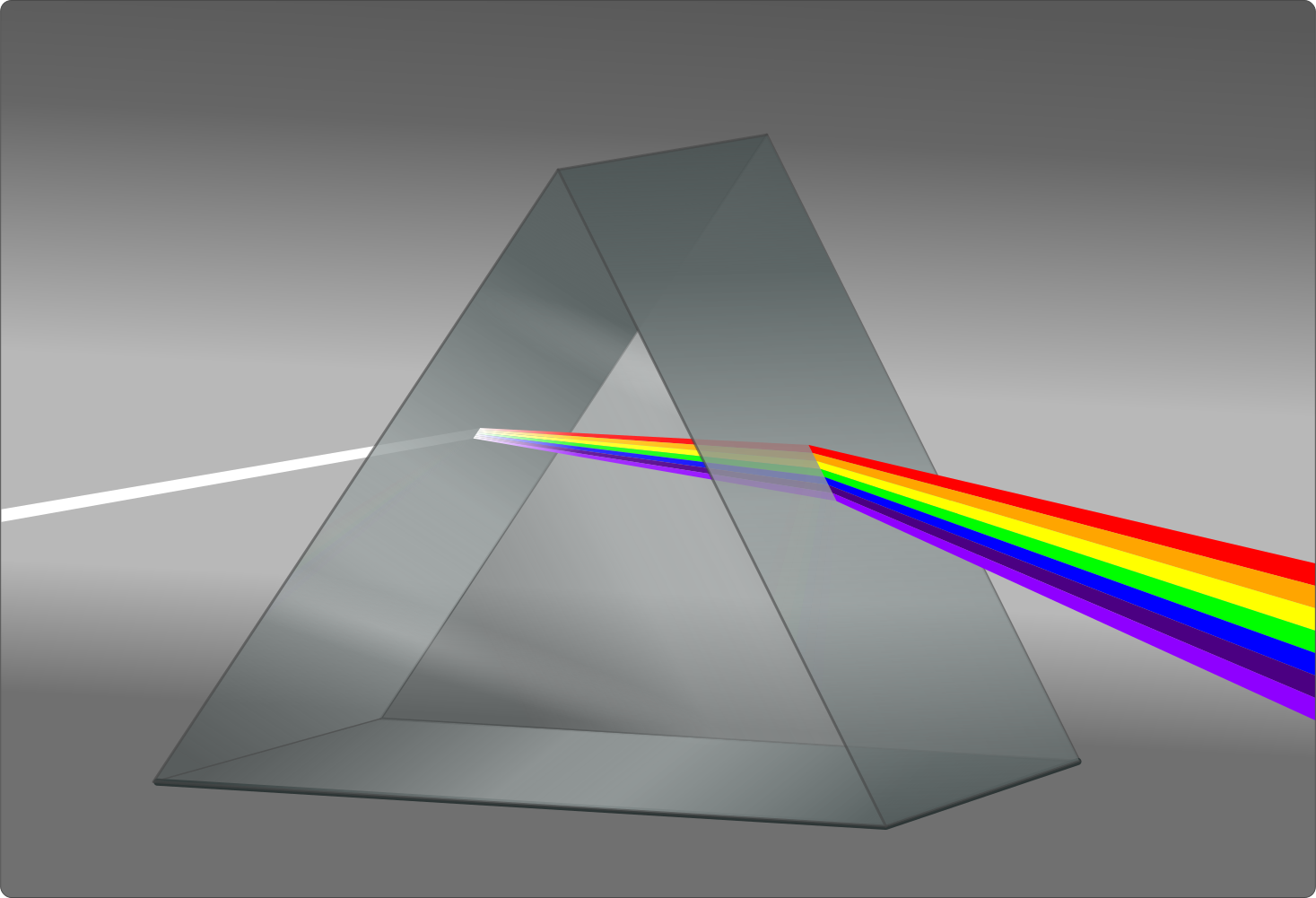
White Light and Dominant Wavelength
This spectrometer is designed exclusively for measuring colored light sources. White light consists of a wide spectrum of wavelengths mixed together, with no single wavelength dominating - making dominant wavelength measurement meaningless. Attempting to measure white light (sunlight, incandescent bulbs, white LEDs) will not provide useful results. For white light sources, you need to measure their color temperature instead using our dedicated Kelvin Meter app.
Device-Specific Variations
Every smartphone and tablet handles colors differently due to varying camera sensors and internal processing algorithms. While the app provides good accuracy on most devices without calibration, some devices may show substantial deviations from true values. This is why the app includes an optional calibration feature.
For comparing the dominant wavelength between different light sources using the same smartphone or tablet, the measurements should be highly reliable when proper measurement conditions are maintained. This makes the app excellent for comparative analysis and educational demonstrations, even when absolute accuracy may vary between devices.
Measurement Environment Matters
Accurate measurements require careful attention to measurement conditions. The camera shall not be pointed at the light source itself. Instead, the camera must be pointed at a white or gray surface (like paper) illuminated only by the target light source. Any ambient light, colored surfaces, shadows from your hands, or reflections will skew results. Even a slightly tinted paper can cause significant measurement errors that the app cannot detect automatically.
Why These Limitations Exist
The constraints aren't app limitations - they're fundamental physics limitations of consumer camera technology. Smartphone cameras are optimized for photography, not scientific measurement. Professional spectrometers costing thousands of dollars use specialized sensors, precise optics, and controlled environments to overcome these challenges. Your smartphone spectrometer represents a remarkable achievement in making wavelength measurement accessible, but understanding its boundaries ensures you use it appropriately and interpret results correctly.
What Users are Saying in Official Reviews
"Very handy for demonstrating, or determining, the wavelength of a given colour and so easy to use. Would be ideal for use in the classroom and a lot cheaper than spectrometer! Also, I contacted Björn with a technical question and he was extremely helpful and prompt in his replies. Great guy!"
"True spectrum in measurement, this is the best spectrometer lighting app."
"love it, I see the world alot clearer now. Thank all of you who worked on this great app."
"Very helpful, didn't have to buy a separate light spectrometer."
"I have a JOOVV red light panel setup that I use daily for ambient and therapy purposes.This App verified to the tee that the light emitted was as advertised."
"Excellent! I've been looking for this function a long time. Very efficient and accurate! Thank you!"
"Best and very accurate. I buy this one lifetime subscription."
"A really great app that helps me a lot to find the exact wavelengths for different colors, I'm really glad I installed it because it's the only app on the store that really works"
"Great app for testing wavelength for red light therapy"
Need Help or Have Ideas?
We're committed to making this app the best it can be. Your feedback matters to us, and we personally respond to every user who contacts us. Whether you have questions, need support, or have ideas for new features, please reach out to us at [email protected]
Wide Language Support
The app has full support for 40 different languages, making measurement accessible worldwide.


Download the Light Spectrometer app now
Enjoy full functionality for a few weeks. After that, choose a one-time fee or subscription — still at a fraction of the cost of a dedicated color temperature meter device.